PCAA185MA
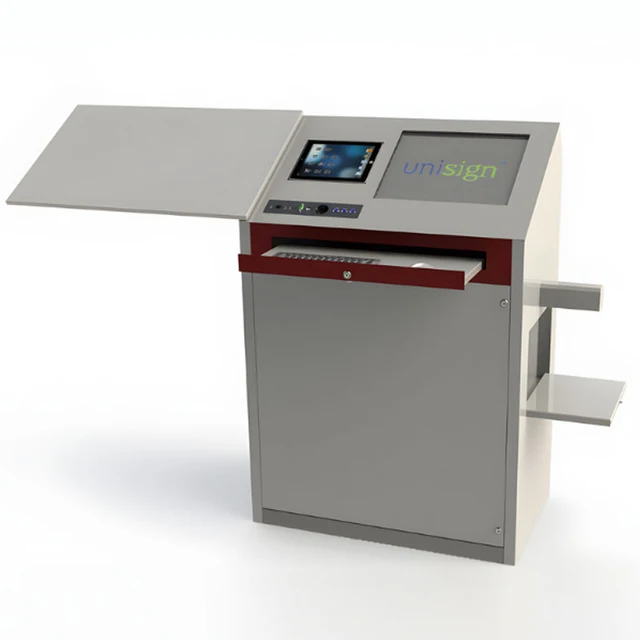
PC101 18.5-inch Digital Lectern
Digital presentation18.5 inch · 1366 × 768 px
Explore productFamily image. Request confirmed dimensions for PC101 21.5-inch Digital Lectern.
Self-Service Kiosks
PC101 21.5-inch Digital Lectern
Bring your presentation controls into one place. PC101 21.5-inch Digital Lectern — display size: 21.5 inch; resolution: 1920 × 1080 px.
Products are supplied on a quotation basis. Share your required quantity, configuration and delivery location to request a project-specific quote.
View manufacturer specificationsA closer look
Plan a speaker-facing interface for your lecture theatre, meeting room or training space. The lectern, room AV equipment and presentation software should work as one agreed configuration. For this model: display size: 21.5 inch; resolution: 1920 × 1080 px.
The details that matter
Model PC101 21.5-inch Digital Lectern
Manufacturer-published values for this model. Confirm the final specification with your quotation.
| Model reference | PC101 21.5-inch Digital Lectern |
|---|---|
| Speaker display diagonal | 21.5 inch |
| Speaker display resolution | 1920 × 1080 px |
| Speaker display typical brightness | 500 cd/m² |
| Touch technology | PCAP Multi-Touch |
Model PC101 21.5-inch Digital Lectern
Manufacturer-published details for this model. Optional configurations remain subject to your quotation.
No manufacturer SKU has been confirmed for this named configuration; use the model reference and source page when requesting information.
| Speaker Display Size | 21.5" |
|---|---|
| Resolution | 1920x1080 |
| Brightness (cd/m² Typ.) | 500 |
| Contrast Ratio | 1000:1 (Typ.) (TM) |
| Viewing Angle (H x V) | 89/89/89/89 |
| Response Time (ms) | 14 (Typ, G to G) |
| Active Display Area | 476.064(W)×267.786(H) mm |
| Touch Type | PCAP Multi-Touch |
| Operating Time | 24/7 |
| Manufacturer listing | 2x USB, HDMI, On/Off, Microphone |
|---|
| Manufacturer listing | Power, USB, Data |
|---|
| Manufacturer listing | 2x HDMI, Microphone |
|---|
| Manufacturer listing | i3 / i5 Integrated PC |
|---|
| Manufacturer listing | Amplifier, Mixer , Microphone, Room Control Panel, Reading Lamp, Cup holder, Card Reader |
|---|
Source checked 2026-10-21. Confirm drawing revision, software licences and the ordered configuration before installation.
Configuration, considered
Agree the speaker interface, audience display if required, AV routing, computer, microphone and optional equipment in the room specification.
Discuss this configuration| Component | Decision for your project |
|---|---|
| Speaker interface | Confirm the speaker display and application. |
| Audience display & AV routing | Agree the audience screen, inputs, outputs and room system. |
| Computer & optional equipment | Confirm processor, microphones, controls and supply responsibility. |
| Installation & access | Check the complete envelope, footprint, cable routing and clearances. |
Model PC101 21.5-inch Digital Lectern
Find the details for your specification and installation.
Choose what you need for PC101 21.5-inch Digital Lectern. Your model and document type will stay with your request.
Before you specify
The primary specifications for PC101 21.5-inch Digital Lectern describe the speaker display. Any audience-display configuration is listed separately and must be confirmed with the quotation.
Agree the computer, AV routing, microphones, control equipment and any audience display for the room. Options and pictured equipment require an explicit supply scope.
Confirm the full enclosure and top-surface envelope, base footprint, cable routing and access clearances. Review the manufacturer illustration and its revision against the ordered configuration.
Share the lectern reference, quantity, room layout, speaker and audience display requirements, AV connections, destination and target timing.
Explore another digital presentation model.
A different customer journey. Review the intended use and configuration.